


TOTP-based two-factor authentication
With Genode's relocation from GitHub to Codeberg comes the need to use two-factor authentication based on time-based one-time passwords (TOTP). This prompted me to create an interactive component for managing TOTP secrets and generating TOTP codes.
As second factor, Codeberg utilizes time-based one-time passwords based on RFC 6238. Once when activating two-factor, a shared secret is generated, which is stored at both sides the web service and the user. The secret has the form of a string of characters (A-Z and 3-9), which is usually presented to the user accompanied with an QR code. With the shared secret established, both parties can give proof to one another that each of them is in possession of the same secret by multiplying the secret with the current time and revealing of few digits (like 6) of the result to each other. The actual secret is never revealed again.
Users of smart phone apps usually import such secrets into an TOTP app by scanning the QR code. But me not wanting to depend on a smart phone or a Linux VM for managing credentials, I desired a Sculpt-native solution.
While scouting for TOTP implementations, I came across the totp generator by Chris Webb, which I immediately liked for its simplicity and good taste. It is a small command-line utility written in less than 100 lines of C and only depending on the HMAC function of libssl. Perfect to understand, dead-simple to port, and nicely documented. The tool leaves the protected storage of the secrets as well as the work flow (user interface) for generating the TOTP codes up to the user. A practical interactive solution calls for a few more puzzle pieces that - so I figured - could be nicely stitched together from existing Genode components.
For the protected storage of secrets, vim's file-encryption feature can nicely step into the picture. By maintaining the secrets in a free-form encrypted text file, the secrets can be annotated, searched for, updated, and backed up in any way the user prefers. A current TOTP code can be generated by spawning the totp command line tool from vim, passing the current line as argument.
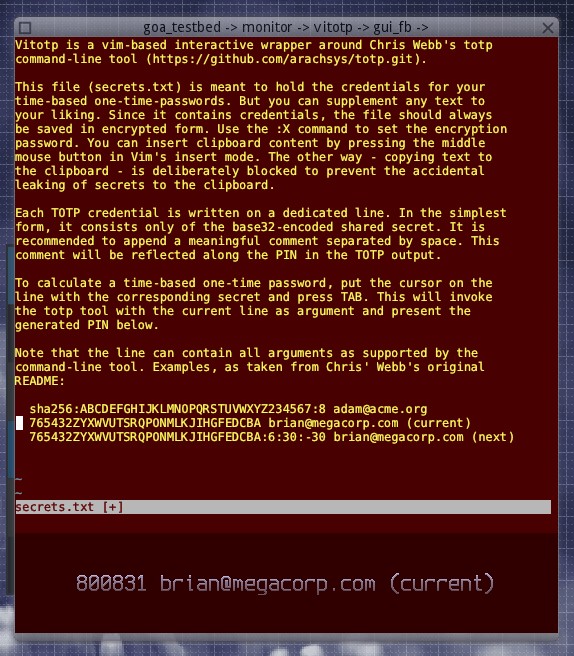
As interactive user interface, I imagined a split window where vim runs in a terminal in the upper part and the last generated TOTP code is presented below using the menu-view widget renderer. Both applications are combined into one window by hosting Genode GUI stack in a nested way.
|
The beautifully looking code at the bottom is re-generated for the current line whenever the user presses the TAB key.
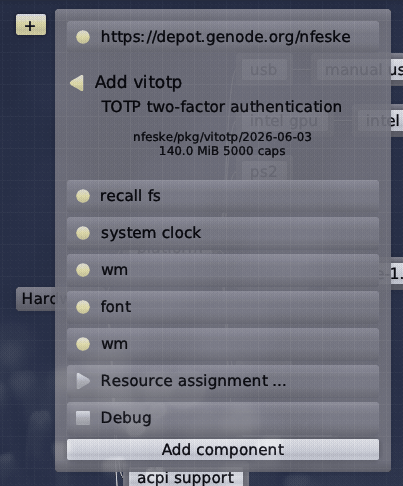
The application can be found in the depot of nfeske in the "Tools..." menu. Here is my recommendation for wiring it up:
|
I store the secrets.txt file in the recall fs. So the protected secrets reside at /rw/recall/vitotp/recall/secrets.txt and can readily be backed up. The connection to the system clock is of course required to compute the TOTP codes. The ROM connection to the clipboard (via the wm) allows the terminal to read from the clipboard via the middle mouse button. This way, new secrets can be easily inserted.
Note the absence of a report connection to the clipboard. Even though the user is in principle empowered to intentionally leak credentials by accessing the secrets.txt file from the system shell, in the spirit of Bell-LaPadula during day-to-day use, secrets are not supposed to be casually copied from vim to the clipboard.
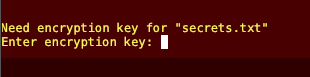
Initially, the text as shown in the first screenshot is read from an unencrypted secrets.txt file. Once after encrypting the file using vim's :X command followed by saving the file, on the next start, the user will be prompted for the passphrase to decrypt the file.
|
With this little tool, which I have turned into an deploy option on Sculpt OS to swiftly bring it up whenever I need it, TOTP-based two-factor authentication has become part of my daily routine. Should you want to risk a look under the hood, let me point you to the vitotp Goa project.